Manage addresses
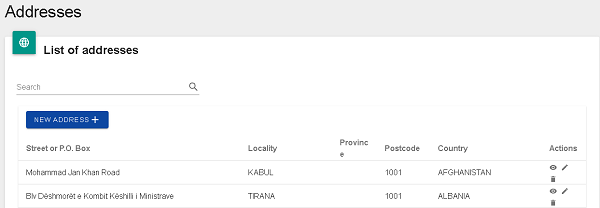
The Addresses function enables you to add a new address, view or modify an existing address or delete an address.
Any changes that you make to an address record are available immediately and do not require UPU validation.
Before creating a new address
- Check whether the new address already exists by following the steps set out under View an address.
- To modify an existing address, follow the steps under Update an existing address.
Add a new address
- Click on the NEW ADDRESS + button. The View/Edit Address Information window is displayed. All fields marked with an asterisk (*) are mandatory.
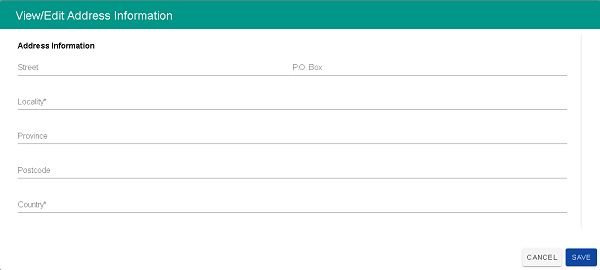
- Enter the Street and the P.O. Box number, if applicable.
- Enter the Locality.
- Enter the Province.
- Enter the Postcode.
- Specify the Country. By default, this displays the country of the logged in user.
- Click on SAVE to save the new address (or on CANCEL to discard the new record). LAHSO generates a unique identifier for the address and adds it to the List of addresses.
- Check the organization report in the publication site to ensure the accuracy of the information entered.
View an address
- Search for the address that you wish to view by entering part of the address in the Search field. LAHSO displays the record(s) corresponding to your criteria.
- Click on the
 View icon for the desired record. LAHSO displays the details of the address in a new window.
 - Click OK to close the window.
Update an existing address
- Search for the address that you wish to update by entering part of the address in the Search field. LAHSO displays the record(s) corresponding to your criteria.
- Click on the
 Edit icon for the desired address. LAHSO displays the details of the address in a new window.
 - Make the necessary changes to the address.
- Click on SAVE.
- If the address list has not been updated for six months, an email is generated to remind you to check whether any updates are needed.
Delete an address
- Search for the address that you wish to delete by entering part of the address in the Search field. LAHSO displays the record(s) corresponding to your criteria.
- Click on the
 Delete icon for the record to be deleted. LAHSO prompts you for confirmation.
 - Click on YES. LAHSO deletes the address and removes it from the List of addresses.